Sunday, January 7, 2007

Some helpful hints

In response to some feedback:


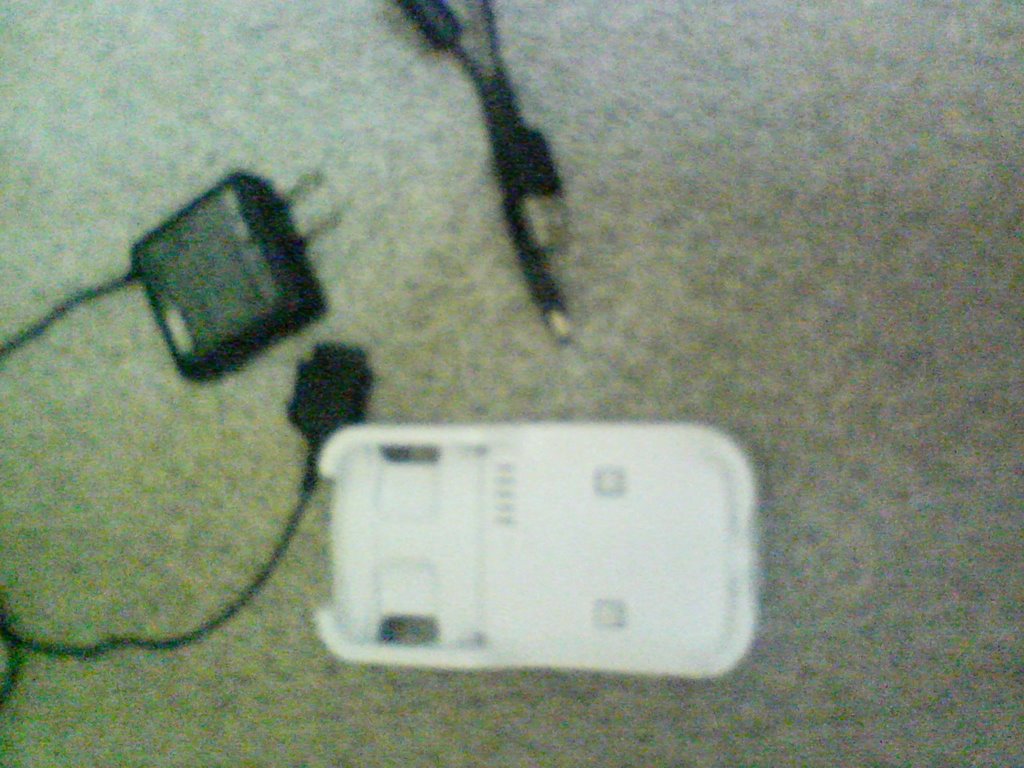
This is the cable kit I received with the phone. On the left is the power adapter and above is the typical USB to miniUSB cable. Both the power cable and miniUSB cable plug into the white cradle from behind, and the phone drops in. Neither cable directly connects to the phone.

Cradle PN 42SOPUA
power supply PN 0202PQA

The USB cable they show here looks like it connects to the side of the phone, and would only charge (likely the same cable you have PN 0201HVA). The cable for the cradle is just a standard USB to miniUSB like with most digital cams and mp3 players.

You might not be able to connect the phone directly to a laptop via a cheap store cable to download. I do not have one to test, but I will try to go get one. In fact, my charger cable has no where to directly connect to the phone, nore does the MiniUSB.

Are you connecting your cable to the left side port that has a slide cover? This is also the port where the headphone adaptor connects. It has a lot of pins, so it is possible that it is chargable via that connector, and yet not have download support.

My best advice without having the cable you have, would be to try to get the full cradle kit.

One more thing you MUST do:
On the phone, go to Functions/Settings
Press 5 (user support)
Press 6 (Data Comm)
Press 3 (USB mode select)
select 3 (User Select)

Now everytime the phone is hooked to the computer, the phone will ask you to choose Data Trasfer or Mass Storage mode.

The default is Data Transfer which is only for au Audio Music Port. It will keep attempting to run that program, and will not let you do anything on the phone without it.
Mass Storage mode will make it act like a normal USB storage device, and allow Sonic Stage to find it. Remember, you only have access to the MMC card, and not the phones primary memory.

As for Sonic Stage, I am using Version 4.2 as well.

Im glad someone is finding the information usefull. Feel free to keep asking questions.

Thursday, January 4, 2007

Using American version of SonicStage

Many people have questions about the Sony Ericsson W42S Walkman phone currently in use by AU/KDDI.

I will attempt to dispel some myths, confirm a few others, and then walk you through the process of getting it working with American versions of XP in (some) English.

The phone:
The phone is one of the few entry level AU phones with English menu options. It has a ‘music’ player (I say that because it is not true MP3, it has to be converted first), a radio tuner, a 3 mega pixel photo and short video camera (with sound and lowlight mode), GPS map location (via web), as well as typical schedule, note, and voice recording capabilities. Note that the GPS likely won’t work anywhere but Japan. The maps are downloaded from the web each time you use it.

It comes with 1 gig of internal memory and has a slot for a Duo MMC. These are the same cards used in PSPs.

Finally, a SIM card rounds out the phone giving it account transfer and global access possibilities. Although, I doubt very many places have compatible service providers.

Memory options:
First I few things about ‘internal’ verses MMC memory:
Yes, the phone comes with a gig of memory built in. Without an MMC card installed, this memory is multi-purpose. It stores applications, music, photos, and video. It is the ‘catch-all’ memory when the user has nothing else installed.

This is NOT the way to get the best use from the phone.

It is advisable that you install a Duo card in the phone. In fact, the process I am about to outline for you won’t work without one, so don’t bother if you don’t have a card installed.

Now, considering the fact that the phone is free with new accounts, or a cheap price upgrade to existing AU customers, the cost of a gig memory card (about $70) makes it all worth it.

What goes where?
With your newfangled Duo card installed, you might be asking: What’s the point?
The point is the phone changes its storage priorities once the card is installed. From now on, photos will get stored to the card. They can however be moved to the phone if you so choose, but there is no point to that, other than saving space for music. Video/audio captures will remain in the phone’s memory due to access speeds required to save and play back that content smoothly. Additionally, any music downloaded from AU music source will also be stored in the phone. To review:
Stored on the phone (1 Gig):
Video
Voice recordings
Downloaded songs
Applications

Stored on the MMC (up to 1 Gig [will likely hold more]):
Photos
User loaded music
General purpose file folder system (USB disk drive)

Ok, so you have your phone, and you have your MMC. You should also have a docking/charging station and the installation CD from AU. How do you get this thing working in English, or at least Engrish?

Steps to Get SonicStage to work with W42S:
1: Explore the AU cd
2: look in the data_communcation_tools\exe folder
3: Run and install:
a: W42S-setup1000
b: aupsetinst

NOTE: an alternate way to get W42S-setup1000 is to Explore the CD to SonicStage CP, and EXTRACT the setup file there. Then Explore to:(Extract root)\SetupSonicStage\Device\Driver\W42S

I have checked hash difference and they appear to match. However I am not guaranteeing that they are the exact same file (hard to mod a file without mod-ing the hash though).

4: open your favorite browser and point it to:
http://musicstore.connect.com/custom/promos/download.html
Now.. Assuming you live in Japan, downloading won’t work for you. Notice about halfway down there is a link that says “Having trouble downloading SonicStage CP? Please click here.”

You are on your own there now.. ;)

5: Install SonicStage English version and reboot.
6: At this point, plug in your phone, and make sure it comes up as a USB drive (choose MassStorage mode on the phone)

In my case, I have Music Port installed as well, so you have to tell it to quite that application.

7: Run SonicStage. It should start up with two panels, the one on the right called “au W42S (drive#)”
EDIT: it may start with only on panel untill you get everything set up for the phone!

8: In SS, go to Tools/Options/Transfer and you should see:
Memory Stick/Network Walkman/Portable IC Audio Player

Choose it and hit Transfer Settings

9: Select ATRAC3 transfer and OK out of both dialogs.


You are now ready to put some tunes in your phone. Remember that SS must convert the files to a format the phone can read. Conversion doesn’t take that long.

I do not know if downloaded music from AU is also in this ATRAC format or not.

Getting your photos:
Simply explore to the DCIM folder on the phone, copy and paste. Easy.

Playing your tunes:
On the phone, go to the Memory Stick folder, then Music folder.

Caveats:
Playing this way does not use the ‘player’ functionality of the phone. So, the Jog wheel and screen modes don’t work. Its sort of a let down that those features only work via downloaded music from AU or perhaps loaded with auMusicPort.

AU Music Port:
I also have this working on my American XP. It was a bitch to set up, and took a few days. I did It like, two months ago so I don’t exactly remember how. I also don’t read Japanese, so need my roommate to translate for me. I have not bothered asking him to help me put music on the phone with it. I would imagine that it will convert and load them to the main folder, and thus use the player controls?

Anyway, if enough people request a tutorial on this, I could get with him and we could write a walk through (it might be good for me to have anyway).
Thursday, June 1, 2006

ITTROV - Video

The video is uploaded.

Two links are:

http://s18.photobucket.com/albums/b118/Fetichet/ITTSub/?action=view&current=ROBOT.flv
or
http://www.yousendit.com/transfer.php?action=download&ufid=83261F0C309AB188

Thank you Ronnie for encoding and uploading it.


The complete photo set (including some not seen in this blog) is available here:
http://s18.photobucket.com/albums/b118/Fetichet/ITTSub/

With the final presentation photoset here:
http://s18.photobucket.com/albums/b118/Fetichet/ITTSub/Sub2/

Wednesday, May 31, 2006

ITTROV - Conclusions and Recommendations

Conclusions and Recommendations

Structural Design and Integration (Tom Gros)

Overall, in terms of structural performance, Project ROV-ITT functioned better than I personally anticipated. It was surprisingly buoyant and maneuverable in the water considering its weight and lack of aerodynamic design.
My primary concern from the onset was the shear weight of the ROV would simply sink it with no chance of maneuvering or surfacing. I reached this conclusion due to fact that the buoyancy of the watertight case was rated at 1.5 lbs. The craft, at 7.5 lbs, far exceeded that rating. Not only did the ROV not sink when it was introduced to the water—it floated to the point where it became necessary to drill holes into the PVC frame in order to provide ballast. In my initial determination, I did not take into consideration the astounding buoyancy of PVC. With the frame now taking on water, all that was required to operate the craft was to add a few pieces of Styrofoam to trim the position of the ROV—that is to position it horizontally in the water.
As far as maneuverability is concerned, the ROV also exceeded my expectations, barring two issues—surfacing and veering left while moving forward. The problem of surfacing was not completely resolved even when a second bilge pump was dedicated to the effort. At a certain depth, the water pressure was simply too great to overcome. In my mind this issue could be overcome in one of two ways. The first would involve a pressure sensor that would automatically turn on the bilge pumps responsible for upward thrust when a critical depth was reached. The second solution would entail replacing the impellers built into the bilge pumps with external propellers designed for thrust.
The fact that the craft consistently veered left, despite our best efforts to rectify the situation, is undoubtedly due to the total disregard to aerodynamics in the design. The solution may lie in the attachment of a bow to the frame—although this may create an unacceptable amount of drag. Electronically, the resolution might be more achievable. If there were a way to control the speed of each motor individually, the veering could easily be eliminated.
Perhaps, the biggest disappointment was the amount of leakage that occurred. Although water penetration could have occurred in any of the six ports used to route wiring into the housing, in my mind, the most likely culprit is the case itself. Although the manufacturer claims that the case is waterproof, it is designed to keep electronic equipment dry in cases of accidental exposure to water. Our application required prolonged exposure not only to water, but also water pressure since the ROV was intended to remain submerged for extended periods of time. Any future applications of this design would have to address this problem.


Software and Electronic Design for ROVITT (Emery Premeaux)

There is plenty of code space and I/O left on the PIC for more features. Using the standard ASCII character set for command input leaves a lot of room. For instance, the operator could press‘t’ to get back water temperature. Capital T could return a second temperature, or something else. P might request a pressure reading. In addition, the PIC has a built in timer, so it could be set up to automatically send information, sort of like a heartbeat. It could respond every two seconds with a temp and pressure message. To continue with the heartbeat analogy, the topside software could be written such that if this message is not received on time, a warning is displayed indicating that the ROV is not in communication.
Other features might include a water temperature sensor and a depth gauge. Another idea might be a device similar to an aerometer to gauge the speed of the sub. Perhaps a leak detector could be included to warn the controller of water intrusion.

ITTROV - Software

Software Design for ROVITT (Emery Premeaux)


The software design for the ITTROV project was a challenge. First and foremost was to categorize how the software should work. This plan would guide the rest of the design process. Unfortunately, it changed constantly as I re-evaluated what was important, and what was not.
I wrote the PIC microcontroller’s code in C, using HI-TECH’s C compiler with their HI-TIDE Integrated Development Environment. The version I used is free to all, and will compile code for a select few PIC chips. I found that after working with the system for a while, I became very comfortable with the IDE and compiling structure. The C programming classes we took in the Bachelors program were very helpful.

In order to get the code onto the PIC chip, I used a programming device called the PICALL. It is connected through the parallel port and has its own software to load up the compiled program and burn it into the PIC.

The final step for the PIC was to return it to a prototyping board I had set up that replicated the circuitry still under construction for the ROV. The board had a clock circuit, a power supply, and the same MAX232 communications chip as the sub would have. The only difference between the test board and the real thing was that the motor outputs on the test board were LEDs rather than the motor driver circuit.

I had decided early on to design the code on the PIC in such a way as to allow the user to operate it from a serial communications program such as Terminal. This meant that all of the commands to and responses from the ROV would be human readable. I wanted the user to be able to enter a command, and the sub would respond back with text confirming the action.
The final system would allow for a separate program written in Visual Basic to control the ROV. This program would connect to the com port of the ROV and act as if it were human. It would read in the responses from the ROV and display status messages on the control panel. When the operator clicks on a command button, the software would take care of sending that command and verifying the ROV received it properly.

The software went through several revisions. The first idea was to accept commands in a string format, such as “1 100.” This would indicate motor one should be operating at 100%. Unfortunately after many days of scratching my head, I found out that the free version of the HI-TECH C does not include string INPUT functions. However it did include string OUTPUT functions. This is important because it meant I could make the sub respond back with a message like “Motor 1 at 100 percent” but I could not take in the command in the first place. In fact, all I could process in was a single character.

The final version of the revision code worked more like a conversation with the ROV. It went something like this:
Enter a Command: 1
Enter a value for motor 1: 1
Motor 1 is ON.

This worked out well, at first. While still building the electronics and integrating them to the frame it was helpful to be able to operate single motors at a time. After a while problems began to surface.

The first problem was that the code executed a sort of timed loop through the nested Select Case statements that made up the code. It expected the commands to occur at specific moments, and could not deal with them when entered at the wrong time. This often led to multiple tries re-entering the commands in the Terminal program. It was also very clunky to try to move the sub around. We need to turn on combinations of two motors. There would be a long time delay between getting both motors to turn on.

It was felt that the interface software on the laptop would alleviate this somewhat. It was being developed in parallel with the PIC code. I had to create needlessly complex code to deal with this ‘conversation delay’ between the PIC and the computer. To make things worse, I had to analyze the responses back from the PIC in order to determine when it was acceptable to send commands.

In order to get around some of this, I wrote the code to use subroutines. For example: Clicking on the ‘forward’ button would call two functions. Each motor has an “On” and an “Off” function. So “forward” would call the “on” functions for the appropriate motors. Each motor function then sets two variables: the motor number and the value (1 for on, 0 for off). This function then calls a final function to communicate this request to the ROV.

This isolated my problems communicating to only one section of code. After working on this process for a long time, I still could not get around the problems with the ROV. There would still be long delays between getting two motors on, if the second motor command ever even managed to get there. The whole deal was unreliable.

It was time for plan B. I had no plan B. It was 3 weeks to the presentation and I had no idea how to fix this. Eventually it came to me while no where near a computer. The design constraint of HI-TECH C was that I could only send one character at a time. So, why bother sending multiple characters to get anywhere?

I completely redesigned the ROV software with only one Select Case process. It now accepted u, d, l, r, f, b, and s. Up, Down, Left, Right, Forward, Backwards and all Stop. I then set all motors appropriately to the command sent. For instance, Up and Down will not affect the other navigation commands, and those commands will not affect Up and Down. However, when Forward is sent, all motors not intended for that command are turned off. This meant that I could only turn in place and not turn while moving forward, but it vastly simplified both sides of the code. The loop also ran much quicker. The ROV was not asking for commands in a timed manner, and accepted them at any given moment.

It was a joy to see my motor LEDs respond instantly to my requests. I was so happy in fact that I placed personality into the responses the ROV gives when it processes a request. For instance, when ‘f’ is sent, the ROV may with “Forward! Aye, aye, captain!”

ITTROV - Frame construction

Tom describes his process of designing the frame:

Structural Design and Integration (Tom Gros)


The final design agreed upon for Project ROV-ITT was a 9 inch x 9 inch x 12 inch frame structure made of ½-inch PVC. Preliminary plans did not include a frame structure at all. Instead they called for the electronics of this project to be housed in everything from capped 3-inch PVC pipe to garden spray canisters. Each option was eliminated one-by-one for various reasons. For example, the option of using a garden sprayer was eliminated because, although it would be large enough to house all of the components and easily waterproofed, the opening was too small to mount the components. Generally, options were eliminated for one or more of the following reasons:
Access to the circuit board would have been difficult or even impossible.
The craft would not have been able to be sealed or resealed.
Securely mounting the bilge pumps without jeopardizing the structural integrity of the craft would have been implausible.
Waterproof routing of the power cables and umbilical to the craft’s interior would have been an issue.
Camera placement would have required the integration of a watertight lens.

Even the PVC frame underwent several design changes. During the first week, we discussed, as a group, different options for the frame’s construction. We concluded that, by mounting some of the components such as the lights, on the outside of the craft and locating others, like the battery, to the surface, a small, light-weight and watertight case would be the perfect option to house a circuit board and camera. The frame would therefore be constructed around the case containing the “brain” of the craft. The initial version was laid out and measured on a two-dimensional plane which resulted in the prototype being oversized and cumbersome—approximately twice the size of the final version. I determined the final design by removing half of the structure and rearranging the placement of the components to be integrated into a more efficient configuration.
The next major challenge consisted of mounting the case used to house the circuit board and bilge pumps used for propulsion onto the frame. The main problem in this endeavor was the fact that both pump housing and PVC frame are round. Merely attaching the pumps to the frame by means of wire ties provided no stability—causing the pumps to slide around the frame when producing thrust. One solution that I quickly eliminated was to dismantle the pump in order to attach the frame by means of bolts. The reason this option was eliminated was the fact that, considering that there are six pumps, this would have been too time consuming and there would be no guarantee that the problem would be solved. Rather, I decided upon a more efficient solution. It was much simpler to attach a floor to the frame to which the pumps could be mounted securely. The materials I decided on to construct this floor were plastic gutter screens and lightweight metal truss ties used to provide stability. The truss ties were also decided upon to be used as mounts for the plastic case.
The remainder of my involvement to this project, until the first test run, consisted of the construction of the umbilical cable and mounting the camera. The umbilical was constructed by zip-tying a section of Cat-5 cable, used for video transmission, to RG-45 cable, used for vessel control and power. Since the watertight case contained a clear lid, mounting the camera was easily accomplished by simply attaching it using double-sided tape. I also completed the final integration of the bilge pumps to the frame. The remainder of my time consisted of helping Ronnie with the integration of the electronics to the structure of the craft. This included routing the wiring from both pumps and umbilical through hose barbs screwed into 6 holes we drilled into the case housing.
The initial test run identified two problems with the structural design of the craft: It was unable to move forward in a straight line and the bilge pump responsible for upward movement did not provide enough thrust to allow it to surface. Emery and I repositioned the pumps to a horizontal rather than vertical orientation in an effort to stabilize them, allowing the craft to move forward without veering to the left. The pump intended to provide downward thrust was remounted to help resolve the lack of surfacing ability. The repositioning of all six pumps also allowed for the remounting of the case from a diagonal to a horizontal alignment, reducing drag and, theoretically, further addressing the veering problem. Other than these two issues, the design merely required some trimming to level its position in the water.


(note: Tom mixed up his cables! The Cat 5 sends power and RS232 data, while the RG-45 sends video.)

ITTROV - Electronics


Ronnie does a good job explaining all the technical details to the circuitry:

Circuit Design and Build


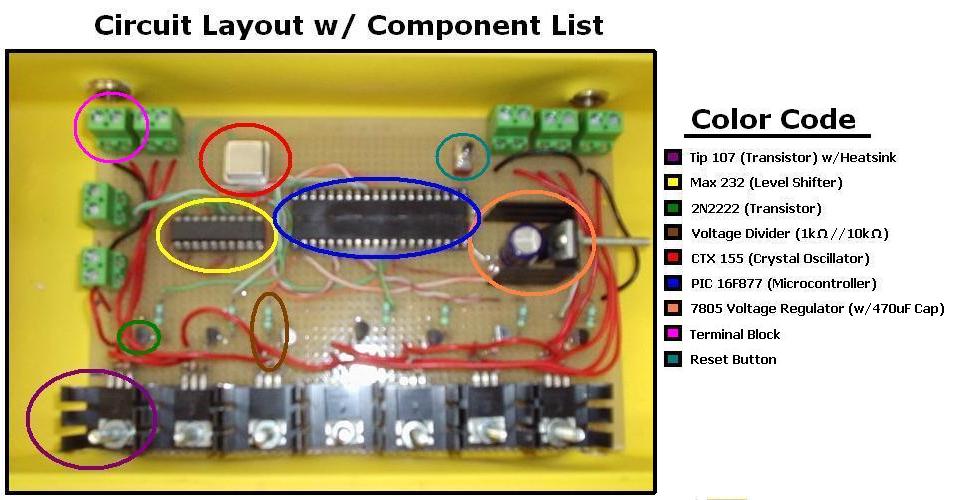
After deciding to use the Rule 360 GPH (gallon per hour) bilge pumps as our source of movement for our under water ROV, the next step was to design and build a circuit board that would be able to switch these pumps ON and OFF.
Since we are going to have a total of six pumps, two for forward, two for reverse, and two for surfacing we would need six switching circuits. Each circuit would control a pump of its own. We also wanted to implement a light that could be turned ON and OFF, but time and resources prevented us from completing that task. With the six pumps and light, we ended up building a total of seven switching circuits.
The Rule bilge pumps could potentially draw up to 3 amps; this was a problem because we were using a PIC16F877 microcontroller. This microcontroller can only source a few hundred milliamps, which is much too small. So the question was “What can we use to switch ON and OFF a large current?” Our answer to this was the TIP 107. The TIP 107 is a Darlington transistor pack, which means it is made up of two other transistors. With a heat-sink the TIP can handle up to 5 amps. This was perfect for the pumps.
However, we still couldn’t drive the base of the TIP with the micro-controller, there was still too much current draw on the PIC. To get around this, we biased the TIP with two resistors. We used a 1k-Ohm and a 10k-Ohm resistor in series creating a voltage divider. The resistors were able to handle the current needed to forward bias the TIP.
Now that we had the TIP in the ON position, we needed to be able to turn it OFF and then ON again. To accomplish this we used a 2N2222 transistor. The PIC can easily turn this ON and OFF, and in turn it will connect the voltage divider to ground, thus turning the TIP OFF and ON again. We also added a 470-Ohm resistor between the transistor and the PIC, this was to limit the current and protect the PIC from burning out.
We did run into a small problem after building our motor circuits. When we tried running the motors, instead of being able to switch a motor ON or OFF, they all ran constantly. We checked our solder joints and grounds, but everything looked to be okay. After we double checked our data sheets we finally realized that we had mixed up the collector and emitter leads on our TIP107 transistor. This was causing the current to flow constantly, which was why we weren’t able to switch the pumps ON and OFF. A quick solder job and a re-test, and everything was working as planned.
Now, to make the PIC work we had to use a CTX 155 crystal oscillator. This acts as the clock pulse for the PIC and runs at 4 MHz. We also used a 7805 Voltage regulator. We took a 9 Volt power supply that would run our external camera, and used it to power the 5 volt regulator at the same time. This meant we had 9 Volts going to the camera and 5 Volts going to the PIC.
The last chip we used was the MAX-232, this is a Maxim RS232 level shifter. Because the laptop’s serial port is a differential output, it uses positive and negative voltages to make the signal. However, the PIC chip is a TTL RS232 and can only handle 0 Volts or 5 Volts. The MAX chip converts them so that they can communicate without blowing things up. We chose this version because it required no external capacitors and would keep things much simpler.
The PIC chip is a microcontroller and has a built in EEPROM (Electrically-Erasable Programmable Read-Only Memory) and program memory. This made it easy to reprogram when necessary. It also has an 8-bit processor with 5 I/O ports.
After many hours of designing and soldering our circuit board was complete. We had seven switching circuits, six of them to run pumps, and an empty slot for a wildcard. Something like a light or emergency surfacing balloon could be implemented. There was also a voltage regulator to control the PIC and an external camera. The MAX 232 enabled us to communicate with a laptop, and the CTX 155 oscillator helped the PIC run smoothly. The rest was up to the software and mechanical development.
The PIC chip has a lot of free code space and open port pins for extra features. Features we would add include a water temperature sensor and a depth gauge. Another idea might be a device similar to an aerometer to gauge the speed of the sub. Perhaps a leak detector could be included to warn the controller of water intrusion.